Most Australian businesses do not need an AI agent simply because AI agents are getting attention.
They need one when a real piece of work is too messy for ordinary automation.
A customer sends an email explaining three problems at once. A supplier uploads an invoice in a layout nobody expected. A sales enquiry needs to be checked against information in the CRM before anyone knows what should happen next. A support request could be answered immediately, but only after information has been gathered from several systems.
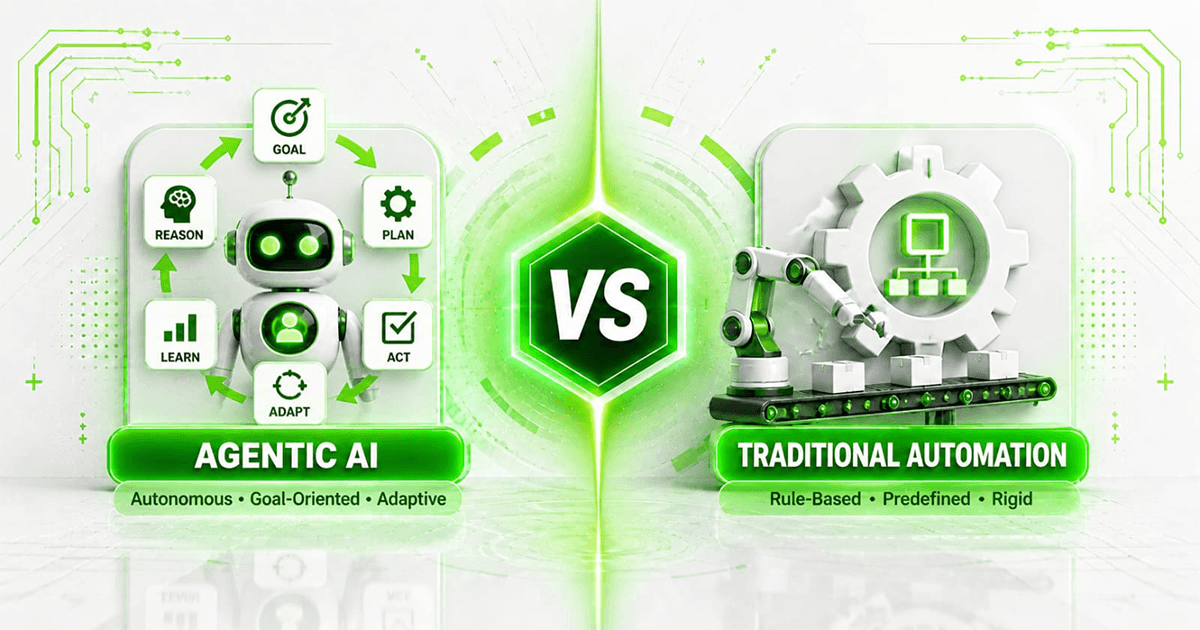
Traditional automation works well when the path is predictable: if this happens, do that.
Real businesses are rarely that tidy.
This is where AI agents become useful. Instead of following only a fixed sequence of steps, an agent can interpret information, choose an appropriate next action, use approved software tools, check the result and either continue or hand the case to a person.
The opportunity for Australian businesses is not to put an "AI agent" everywhere. It is to identify the workflows where interpretation, repetitive decisions and manual handoffs are already costing time.
What Is an AI Agent?
An AI agent is software designed to work towards a defined goal by combining an AI model with instructions, business context and tools it is allowed to use.
Consider a new sales enquiry.
A conventional automation might follow a rule such as:
New form submission → create CRM contact → notify salesperson.
That is useful, but it does not understand much about the enquiry.
An AI agent could potentially read what the customer wrote, identify the service they need, check whether important information is missing, look up an existing customer record, classify the opportunity and prepare the next appropriate action.
Depending on how the system is designed, that action might be:
- asking the customer for missing information;
- creating or updating a CRM record;
- assigning the enquiry to the correct person;
- preparing a response for approval;
- checking an internal knowledge base;
- creating a task;
- booking an appointment through an approved integration; or
- escalating the enquiry when it falls outside the agent's authority.
The important distinction is authority.
A production AI agent should not simply be connected to every business system and told to work things out. It should have a defined job, controlled access to specific tools and a clear point at which a human takes over.
That is the difference between an interesting AI demonstration and an agent you can trust with actual business operations.
How Do AI Agents Actually Work?
Strip away the terminology and an agent normally goes through a simple loop:
Understand → decide → act → check → continue or escalate.
Suppose an electrical services company receives an enquiry:
"We've just taken over a warehouse in Parramatta. Several lights aren't working and we need someone to inspect the switchboard as well. Can somebody come Thursday morning?"
A useful agent would not need a separate hard-coded rule for every possible way a customer could phrase that request.
It could interpret the message, extract the location and requested timing, identify the likely service categories and determine what information is still required.
The agent might then use approved tools to check service coverage, create the lead, inspect available appointment slots and prepare a response.
The AI handles the ambiguous language.
Normal software should still handle deterministic operations such as retrieving an available appointment from the scheduling system or writing an approved field into the CRM.
That distinction matters.
If an ordinary API call or workflow rule can reliably complete a step, there is little reason to make an AI model responsible for it.
AI Agents vs AI Automation: What Is the Difference?
The terms are often used interchangeably, but they should not be.
Traditional automation is strongest when the process can be described in advance.
For example:
Invoice marked paid → update accounting record → update CRM → send receipt.
There is almost no judgement required. A normal workflow can handle it faster and more predictably.
An AI agent becomes more useful when the next action depends on interpreting information or context.
For example:
Customer email arrives → understand the request → inspect customer history → determine the appropriate action → use the relevant tool → escalate if uncertain.
In practice, strong systems often combine both approaches.
The agent handles interpretation and decisions that genuinely require context. Conventional workflow automation handles the predictable steps around it.
The goal is not to use as much AI as possible. It is to use the least complicated system capable of doing the job reliably.
Where Can Australian Businesses Use AI Agents?
There is no universal "best" AI agent. The right opportunity depends on where employees are currently spending time reading, checking, deciding, copying and following up.
A few areas are particularly worth examining.
1. Sales Enquiry Qualification
Sales teams receive enquiries of wildly different quality.
Some are ready to buy. Some need more information. Some are existing customers asking for support. Others are outside the company's service area or have requirements the business does not provide.
An AI agent can make the first pass.
It could read an enquiry, extract the important details, check existing CRM information, identify missing fields, categorise the request and route it appropriately.
A good system does not need to make the final sales decision. Its job may simply be to ensure the salesperson starts with a clean, useful record instead of an unstructured email.
For businesses where sales administration has become the bottleneck, this can sit alongside broader CRM and sales automation.
2. Customer Service
A customer asks a question that requires information from a policy document, their account and a previous support interaction.
A basic chatbot may answer from a list of frequently asked questions.
An agent can potentially do more.
With carefully controlled access, it can identify the customer, retrieve permitted information, search approved company knowledge, decide whether the request can be resolved automatically and prepare or provide an answer.
When the situation is unusual, sensitive or outside its permissions, it should hand the conversation to a person with the context already collected.
That last part matters. A useful agent knows when not to answer.
3. Document Processing
Invoices, applications, contracts, purchase orders and service reports rarely arrive in one perfect format.
An AI agent can help interpret the document, extract relevant information, validate it against business records and decide what should happen next.
The surrounding workflow might then create a draft transaction, route an exception for review or request missing information.
For document-heavy operations, this can form part of a broader document processing automation system rather than operating as an isolated AI tool.
4. Finance Administration
Finance is full of workflows that look simple until exceptions appear.
An invoice may not match a purchase order. A supplier name may differ from the accounting record. A payment might need investigation before it can be reconciled.
AI can assist with the interpretation around those exceptions while deterministic rules continue to control financial actions.
High-consequence steps—particularly approvals and movement of money—should remain tightly controlled.
5. Internal Knowledge
Employees repeatedly ask questions whose answers already exist somewhere inside the business:
What is our process for this type of refund?
Which template should I use?
What does this customer contract say?
How do we handle this particular service request?
An internal agent can search approved company information and help employees find answers without manually searching through folders, documentation and old messages.
The difficult part is not building a chat interface. It is ensuring that the underlying information is current, permissioned and trustworthy.
6. Operations and Job Management
Service businesses often coordinate enquiries, bookings, jobs, customer updates, reports and invoicing across several systems.
An agent can act as the interpretation layer between those systems.
For example, it could read a technician's job notes, identify that additional work has been recommended, update the job record and prepare the appropriate follow-up for office staff to review.
The person still controls decisions that matter. The agent removes the administrative handoffs around them.
What Makes a Good AI Agent Use Case?
A process does not become a good candidate simply because a language model can participate in it.
Look for a combination of four things.
The Work Happens Often
Automating a task that occurs twice a year rarely produces much operational value.
A task performed 30 times every day is different.
Interpretation Is Actually Required
If every input is structured and every decision follows a fixed rule, conventional software is usually enough.
Agents become more interesting when emails, conversations, documents or unusual cases need to be interpreted.
The Agent Has Useful Tools
An agent that can only generate text has limited operational value.
An agent connected safely to the right tools can retrieve information, update records, create tasks, query systems and trigger approved workflows.
There Is a Clear Escalation Path
No production system should depend on the model being correct every time.
Define what the agent can do, what requires approval and what happens when confidence is low.
If nobody knows who owns an exception, the workflow is incomplete.
A Practical Example: An AI Agent for a Trades Business
Imagine a plumbing company receiving enquiries through its website and email throughout the day.
Today, an office employee may need to read each message, determine whether it is an emergency, identify the suburb, work out what kind of job it is, check whether the company services that area, enter the details into job-management software and respond.
Now imagine an agent doing the first layer of that work.
A message arrives:
"Hot water system has stopped working. We're in Penrith and there are five people in the house. Is there any chance someone can come today?"
The agent extracts the location, identifies the hot-water issue, recognises the urgency and checks approved business rules.
If the required information is available, it can create the job record and query the scheduling system.
If an important detail is missing, it can request it.
If the situation falls outside normal rules, it sends the case to the office team rather than inventing an answer.
The business has not replaced its plumber or its operations manager.
It has reduced the amount of repetitive coordination surrounding their work.
What Should an AI Agent Be Allowed to Do?
This question should be answered before development begins.
Think in levels of authority.
At the lowest level, the agent can read and recommend. It gathers information and suggests an action, but a person executes it.
The next level is draft and approve. The agent prepares the email, CRM update, quote or other action, and a person approves it.
Then comes act within defined boundaries. Routine low-risk actions can happen automatically, while exceptions require approval.
Some processes may eventually support more autonomy, but autonomy should be earned through testing and evidence rather than assumed at the beginning.
A customer support agent may be allowed to answer an approved product question automatically.
It probably should not issue an unusual A$8,000 refund because it interpreted a complaint incorrectly.
The technical question is not simply, "Can the agent do this?"
The operational question is, "Under what circumstances should we allow it to?"
AI Agents and Privacy in Australia
Privacy deserves attention early in the design process, particularly when an agent handles customer, employee or other personal information.
The Office of the Australian Information Commissioner says privacy obligations can apply to personal information entered into AI systems and personal information generated by them. Its guidance recommends due diligence when selecting AI products and consideration of privacy and security risks, access to information, transparency and human oversight.
That means an Australian business considering an agent should be able to answer questions such as:
- What information can the agent access?
- Does it actually need that information?
- Which external providers process it?
- Where is information stored?
- How long is it retained?
- Who can see agent outputs and logs?
- What happens when the agent is uncertain?
- Which actions require a person to approve them?
- Can sensitive information be excluded or masked?
Do not wait until an agent is finished to think about these questions.
Privacy, permissions and data handling are part of the system architecture.
Australia also has government guidance for responsible AI adoption. The practical themes are familiar: accountability, risk management, data governance, testing, monitoring and meaningful human oversight.
For a production system, these are not paperwork exercises. They affect how the agent should actually be built.
What Can Go Wrong With an AI Agent?
The most obvious problem is an incorrect answer.
It is not the only one.
An agent can misunderstand an email, retrieve the wrong record, call a tool with incorrect information, repeat an action, encounter an unavailable API or receive input nobody anticipated.
This is why production engineering matters more than an impressive demonstration.
A reliable agent needs controls such as:
- restricted tool permissions;
- input and output validation;
- confidence or escalation rules;
- human approval for high-consequence actions;
- duplicate prevention;
- authentication and access controls;
- activity and decision logs;
- monitoring;
- retry behaviour;
- failure alerts; and
- a recovery path when something goes wrong.
The useful question is not:
"Did the demo work?"
It is:
"What happens when the agent gets something wrong at 3:17 pm on a busy Tuesday?"
If the answer is unclear, the system is not ready.
When Should You Not Use an AI Agent?
Sometimes the best AI-agent decision is not to build one.
Avoid adding an agent when:
- a simple software rule solves the problem;
- the workflow happens too rarely to justify development;
- employees cannot agree on how the process should work;
- source data is consistently unreliable;
- the agent would have no useful system access;
- errors would create unacceptable consequences without meaningful oversight; or
- there is no measurable operational problem to solve.
Consider an employee copying customer information from one database into another every afternoon.
That probably does not require an AI agent.
An integration may solve it.
Now consider an employee reading hundreds of customer emails, understanding what each person needs, checking several systems and deciding what should happen next.
That is a much stronger candidate.
AI agent development should begin with that distinction rather than with the technology itself.
How Much Does an AI Agent Cost in Australia?
There is no meaningful single price for an AI agent because the phrase describes systems with very different scopes.
A small internal agent working with one knowledge source is not comparable with an operational agent integrated with a CRM, accounting platform, email, internal database and approval system.
Cost is usually influenced by:
- number and complexity of integrations;
- quality of existing APIs;
- workflow complexity;
- volume of requests;
- data preparation;
- security and permission requirements;
- testing requirements;
- human-review workflows;
- hosting;
- AI model usage;
- monitoring; and
- ongoing maintenance.
The better question is not simply, "How much does an AI agent cost?"
Ask:
"What does the existing process cost us, and what measurable part of that cost could a reliable agent remove?"
If four employees collectively spend 25 hours every week handling a repetitive workflow, there is something to measure.
If the proposed agent saves ten minutes once a month, there probably is not.
For current implementation ranges, use the Mintodes pricing page rather than relying on figures that may become outdated.
How to Start With AI Agents in Your Business
Do not begin by asking which model to use.
Start with the work.
Step 1: Find the Repeated Decision
Look for the sentence:
"Every time this happens, somebody has to read it, check something and decide what to do."
That is worth investigating.
Step 2: Map the Current Process
Document the trigger, inputs, systems, decisions, actions, exceptions and final outcome.
Pay particular attention to the points where somebody has to interpret unstructured information.
Step 3: Separate Rules From Judgement
Mark the steps that are completely predictable.
Those should normally remain conventional automation.
Then identify the steps requiring interpretation or contextual decisions. Those are the places where an agent may add value.
Step 4: Define the Agent's Authority
Write down what it can read, what it can change, what it can send, what it can approve and what must be escalated.
Do this before giving it access to production systems.
Step 5: Measure the Existing Process
Record volume, handling time, delays, error rates and rework.
Otherwise, six months later you may have an impressive system and no evidence that it improved the business.
Step 6: Build One Useful Workflow
Do not begin with an "AI employee that runs the business."
Build one narrow system that completes one real workflow reliably.
Step 7: Test the Ugly Cases
Test missing information.
Test contradictory information.
Test duplicate requests.
Test unavailable systems.
Test unexpected document formats.
Test cases where the correct answer is to ask a human.
The edge cases tell you more than the perfect examples.
Step 8: Expand Only After It Works
Once the first workflow produces measurable value, identify the next bottleneck.
That is how AI agents become useful infrastructure rather than another abandoned experiment.
AI Agents Are Not Digital Employees
It is tempting to describe agents as employees because the metaphor is easy to understand.
Operationally, it can be misleading.
Employees bring judgement, accountability, lived experience, interpersonal understanding and the ability to recognise situations nobody anticipated.
An AI agent is software.
It can be extremely useful software, but it still needs boundaries.
The strongest implementations tend to give software the repetitive interpretation and coordination work while keeping people responsible for decisions where context, accountability and consequences matter.
That is a less dramatic vision of AI.
It is also much more useful.
Frequently Asked Questions
What are AI agents?
AI agents are software systems that use AI to interpret information, decide what action to take and interact with approved tools or systems to work towards a defined goal. Unlike simple rule-based automation, an agent can be useful when the workflow contains unstructured information or variable decisions.
Are Australian businesses using AI agents?
Australian organisations are adopting AI across different business functions, but "AI agent" covers a broad range of implementations. Businesses should evaluate agents against a specific operational workflow rather than adopting them simply because the technology is available.
What can an AI agent automate?
Common candidates include sales enquiry qualification, customer support, document processing, internal knowledge retrieval, CRM administration and operational coordination. The best use cases involve frequent work where some interpretation is required.
What is the difference between an AI agent and a chatbot?
A chatbot primarily holds a conversation. An agent can potentially take actions through tools it has been authorised to use. For example, instead of only telling a customer how to book an appointment, an agent may be able to check an approved scheduling system and create the booking.
Do AI agents replace workflow automation?
No. They usually complement it. Conventional automation remains better for predictable rules and system-to-system actions. AI agents are more useful for parts of a workflow requiring interpretation or contextual decisions.
Do AI agents need human oversight?
The appropriate level depends on the use case and consequences of an error. High-impact or unusual actions should have meaningful human controls. A well-designed agent should also know when to escalate instead of guessing.
Are AI agents safe for customer data?
They can be designed with strong controls, but privacy and security depend on the architecture, providers, data flows, permissions and use case. Australian businesses handling personal information should assess their obligations under applicable privacy law and relevant OAIC guidance before deployment.
How long does it take to build an AI agent?
It depends far more on the workflow and integrations than on the chat interface. Connecting systems, defining permissions, handling exceptions, testing, security and monitoring are often the substantial parts of production development.
Does every business need an AI agent?
No. If a process can be handled reliably with a straightforward integration or rules-based workflow, an AI agent may add unnecessary complexity and cost.
Start With the Workflow, Not the Agent
The question for Australian businesses is not whether AI agents are impressive.
They are.
The useful question is whether one can remove a specific operational bottleneck without creating a larger one.
Find the work where employees repeatedly read something, check several systems, make a routine decision and move information to the next place.
Measure how much that process currently costs.
Separate the predictable steps from the ones that genuinely require interpretation.
Then decide whether ordinary automation, an AI agent or a combination of both is the simplest reliable solution.
If you have a workflow like that, book a free automation audit. Bring one process your team repeatedly handles by hand. We can map where the time goes, what should remain human and whether an AI agent is actually the right tool.